Quick Tour
(virtual tour coming soon)
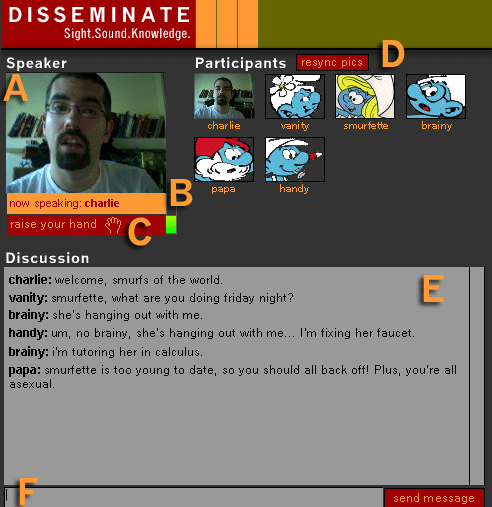
- This is the video feed from the speaker that the moderator has currently selected to have the floor.
- The audio meter only appears when you are the selected speaker. When you are the selected speaker, your computer's audio speakers are
automatically disabled to prevent feedback. This meter lets you know whether or not your signal is going out to the Disseminate server.
- Use the raise your hand button to tell the moderator that you wish to speak. The moderator sees a list of the people who have raised their
hand in the order that they raised them.
- The Participants section shows snapshots of all the seminar participants. These snapshots are taken each time you login to Dissemiante.
Clicking on a participants snapshot brings up a window providing extra information about that participant. You provide this information for
yourself when you create your user login. If you see some names without corresponding pictures, press the resync pics button to syncrhonize
the pictures on the server with your copy of Disseminate.
- The Discussion section allows a text chat to take place in addition to the video-based conversation. This chat is saved in sync with the
audio and video for later viewing. Any participant can send a chat message at any time.
- This text field is where you enter text messages you would like to send. You can either hit the return key or press the send message
button to send the message to the text chat.