Privacy
When you log into Disseminate, the privacy menu will shoot up automatically. Disseminate needs permission to access your microphone and webcam as Flash blocks this access by default for security reasons. Check the "Allow" button to grant permission to access these. Next hit the microphone button to setup your microphone.
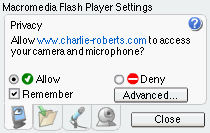
To learn more details about these settings visit Macromedia's page that details the Flash privacy options.
Next > Microphone settings